

Debt Spreadsheet: Your Simple Path to Freedom
Hey folks, it's Ren here. Picture stubbing your toe in a dark room.
You know the furniture is there. You just cannot see it, so you shuffle around, wincing, bracing for the next bump. Then someone flicks the light on, and suddenly you can walk straight across the room. Nothing in the room changed. You can just see it now.
That is what a debt spreadsheet does. You cannot defeat what you cannot see, and right now your debt is probably scattered across five statements and one anxious feeling. A spreadsheet is the light switch.
"The first step toward getting somewhere is to decide you're not going to stay where you are." — J.P. Morgan
🔍 Why your debt feels overwhelming
Here is something I want you to hear: you are not struggling because you are bad with money. You are struggling because scattered information creates paralysis. Six logins, three due dates, one vague total in your head, of course that feels heavy.
A debt spreadsheet pulls it all into one place, and when you can see everything at once, something shifts:
- Panic turns into a plan.
- Vague dread turns into specific, doable steps.
- You spot patterns you could not see before.
- Progress becomes measurable, which means it becomes motivating.
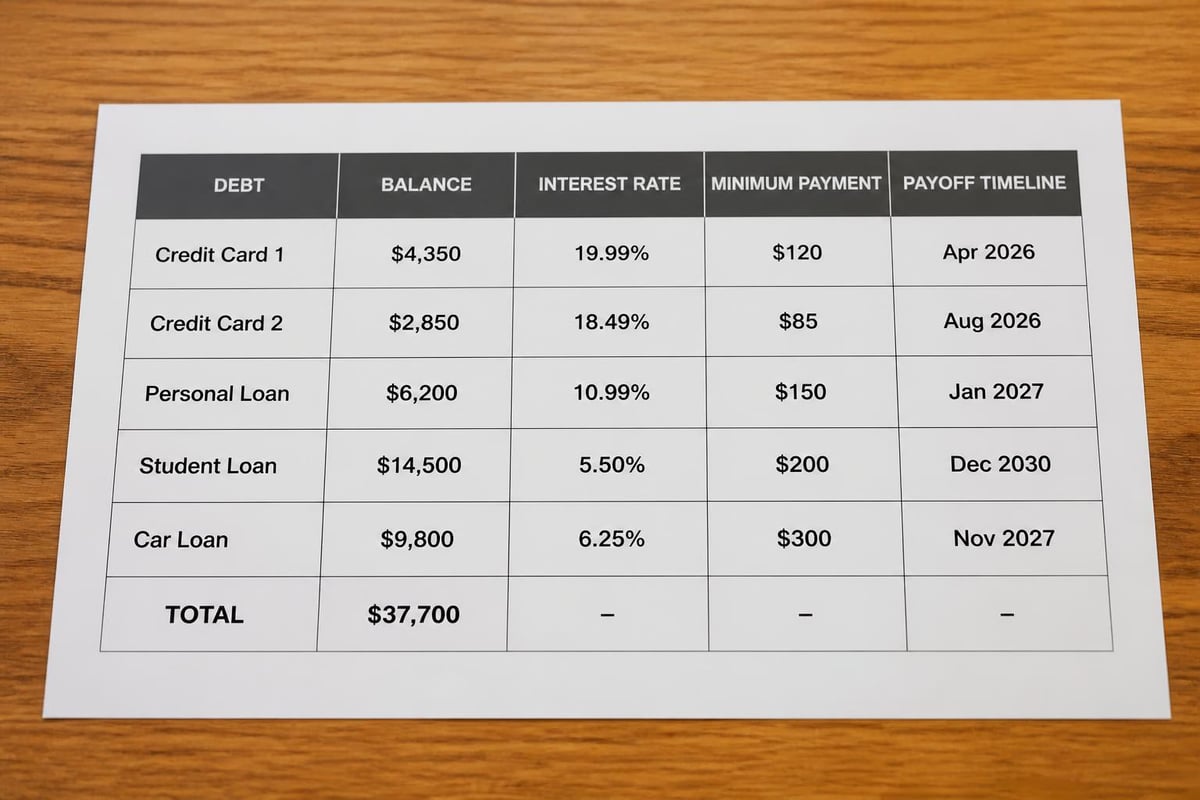
📝 What goes into your debt spreadsheet
It does not need to be clever. Five columns are the whole foundation: the creditor's name, the current balance, the interest rate, the minimum payment, and the due date. Start there. You can always add power columns later, an extra-payment field, a payoff date, total interest paid, but those five let you make every smart decision you need to make.
The beauty of a spreadsheet is that it bends to your life. Medical debt? Add a row. Money owed to your sister? Add a row. Negotiating a settlement? Add a note. It is yours.
Choosing your payoff method
Once your debts are visible, you pick a strategy. The snowball orders them smallest balance first, so you get a fast win and roll that payment onward. The avalanche orders them highest interest rate first, so you save the most money. Avalanche wins on the calculator. Snowball wins in real life more often, because the method you actually finish beats the one that is perfect on paper.

✅ Build your spreadsheet in fifteen minutes
- Open a new sheet in Google Sheets or Excel.
- Create the five column headers.
- List every single debt, including the small ones you would rather forget.
- Fill in the numbers from your most recent statements.
- Total each column, choose your method, and set one realistic extra payment.
Most people find this surprisingly calming. You are not creating new problems. You are switching the light on so you can finally see the ones you already have, and walk straight past them.

Want the light already on?
You can build your own spreadsheet, and the steps above are all you need. But if you would rather skip the setup, the Complete Debt Payoff Planner has the columns, formulas, payoff dates and progress tracking ready to go. Trusted by over 70,000 customers, no subscription, yours forever.
Get the Debt Payoff Planner →🚫 Mistakes that keep the room dark
- Not updating it regularly. Fix it: update it every time you make a payment. A weekly five-minute check keeps it real.
- Forgetting interest. Fix it: balances grow between payments, so account for new interest each month or your numbers drift.
- Ignoring new debt. Fix it: if you add new charges while paying old ones, you are on a treadmill. Track new spending separately.
- Setting an unrealistic extra payment. Fix it: start with $50 or $100. Consistency beats intensity, every single time.

🎯 Your action steps this week
- Gather every statement, credit cards, loans, all of it.
- Open a blank spreadsheet and build the five essential columns.
- List every debt, add the rates and minimum payments, total it up.
- Choose snowball or avalanche, and set one small extra payment for this month.
- To turn this tracker into a full plan with a payoff date, read our debt planner guide.
That is it. You are now ahead of most people, who just think about dealing with their debt someday. The light is on. The room is the same. You can just see it now.
Prefer to skip the spreadsheet for a minute? Our free debt snowball and avalanche calculator shows your debt-free date and total interest the moment you enter your balances.
❓ Frequently asked questions
What is a debt spreadsheet?
A debt spreadsheet is a single document listing every debt with its balance, interest rate, minimum payment and due date. It replaces scattered statements with one clear view you can actually act on.
How many columns do I really need?
Five: creditor, balance, interest rate, minimum payment, due date. Everything else is an optional extra you can add once the basics are working.
Is a spreadsheet better than a debt app?
For most people, yes. A spreadsheet is free, you own it, it works offline, and your financial data stays on your device rather than in someone else's cloud.
How often should I update my debt spreadsheet?
Every time you make a payment if you can, or a quick weekly check-in. A spreadsheet from three months ago is fiction, not a plan.
You have got this. One light switch, one clear room, one cleared balance at a time.
To your financial freedom,
Ren
About Ren
Ren is the founder of JRen Digital, home to minimalist budgeting and debt spreadsheets trusted by over 70,000 customers worldwide. Ren writes practical, no-nonsense guides that help everyday people take the stress out of money. Explore the full range of templates at jrendigital.com.
Keep reading
This article is for general information only and is not financial advice. It does not take into account your personal situation, needs or objectives. Please consider speaking with a qualified financial adviser before making financial decisions.